
Reservations and Sales
Sales & Reservations
One flow from sale to reservation to collection
With Turasistan App, you see the tours open for sale with their capacity, packages and prices on one screen and create a reservation in a few steps. The moment a reservation is saved, the sales invoice is created and the collection process begins.
Your sales team, accounting and operations work with the same information; no one enters the same data twice.
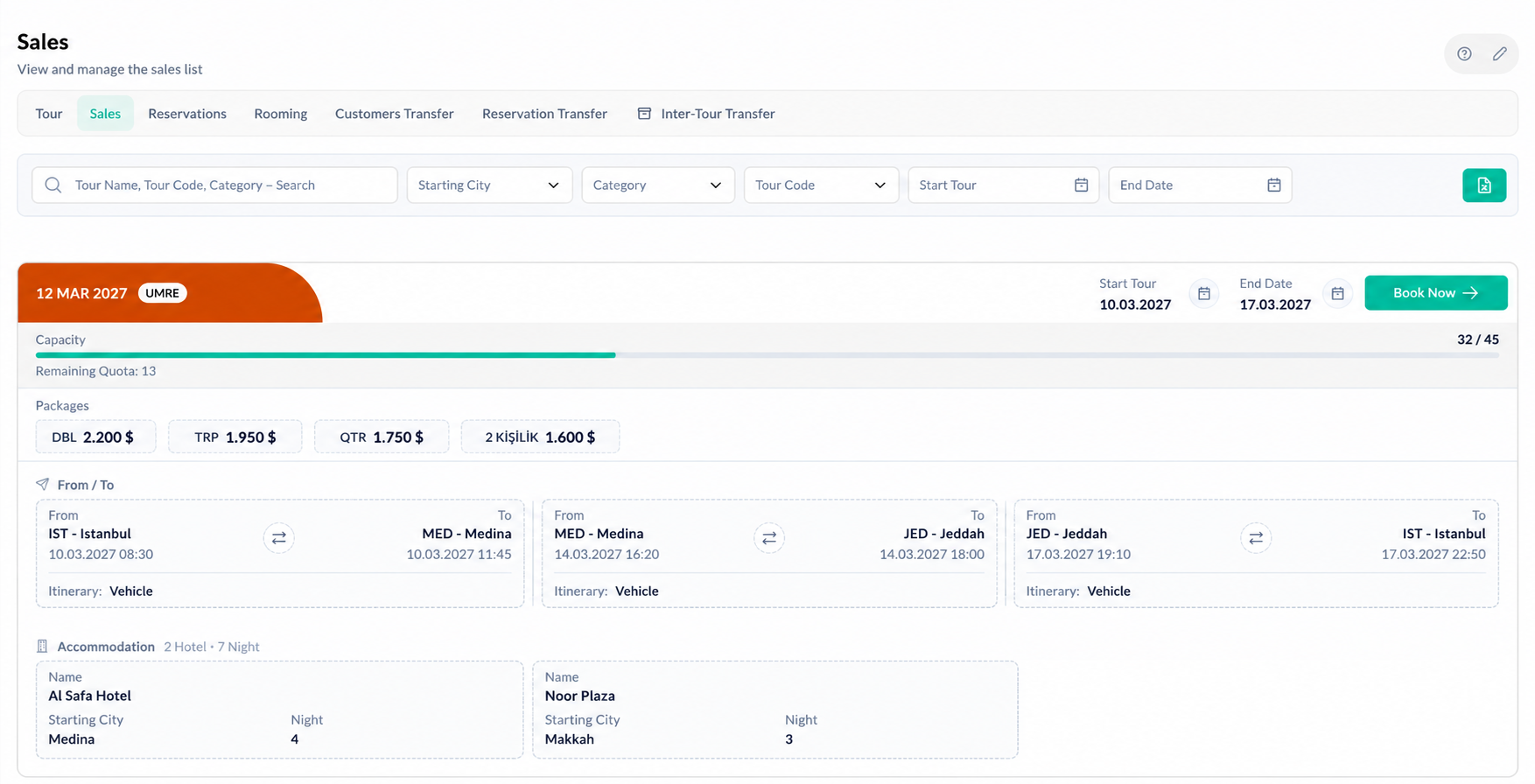
— Sales screen
All tours on sale, on one screen
On the sales screen, search your tours by tour name, tour code or category. See each tour's capacity, remaining quota, packages and prices, plus a flight and accommodation summary, on a single card.
Even while a customer is waiting on the phone, you can instantly tell them how many seats are left and what each package costs.
- ✓Search by tour name, tour code and category
- ✓Capacity and remaining quota
- ✓Packages and prices in different currencies
- ✓Flight and accommodation summary
— Reservation
Create a reservation in a few steps
Choose the tour, add travelers from your existing customers or create a new customer. Set the company, dealer, package and room type; you can apply the package and room selection to all travelers at once.
Mark the reservation status as pre-request, pre-registration or confirmed registration. The amount is calculated automatically based on the selected package.
- ✓Selecting existing customers or creating a new customer
- ✓Company (account) and dealer selection
- ✓Package and room type selection, applied to all travelers at once
- ✓Pre-request, pre-registration and confirmed registration statuses
- ✓Amount calculated automatically from the package
- ✓Adding documents, hotels, extra flights and sightseeing to the reservation
- ✓Flagging staff travelers
— Reservation management
Manage all your reservations in one place
Track all bookings and room allocations from the Reservations and Rooming tabs on the tour screen. Confirmed registration status is also linked to the visa process; only confirmed travelers can be added to visa groups.
When plans change, move a traveler or reservation to another tour. After the move, simply enter the package and price details on the new tour.
— Collection
Seamless from sale to collection
The moment a reservation is saved, the customer's sales invoice is created and the balance is reflected in their account. Click "Take payment" in the customer list and a payment link is generated automatically; your customer pays online and the payment is posted to accounting on its own.
You can also record payments made by bank transfer, cash or credit card as collections, and track in real time who owes you how much.
- ✓Automatic sales invoice with every reservation
- ✓Balance tracking per customer
- ✓Automatic payment link with "Take payment"
- ✓Bank transfer, cash, credit card and installment collection records
- ✓Sales and collections in different currencies
Finance and online payment features are included in the Full Package.
— Sales tracking
Quotes, pro forma invoices and sales reports
Prepare quotes and pro forma invoices for your customers and track the sales process in the same system from the very first conversation. See which tour and which dealer sold how much with the agency sales report and the dealer performance report.
How does it work?
Choose the tour
See capacity, packages and prices on the sales screen.
Add travelers
Select an existing customer or create a new one.
Set the details
Choose the company, dealer, package, room and registration status.
Save
The amount is calculated automatically and the sales invoice is created.
Collect
Send a payment link or post the payment to accounting.
Ready to connect sales, reservations and collections?
Run your sales and collection flow in one system with Turasistan App.
Yes. You can add multiple travelers to one reservation and apply the package and room selection to all of them at once.