
Channel Management
Enter your tour once, sell it on every channel
In e-commerce, sellers distribute their products to many marketplaces from a single panel, without updating prices and stock on each site separately. Turasistan App's channel management brings the same approach to tour sales.
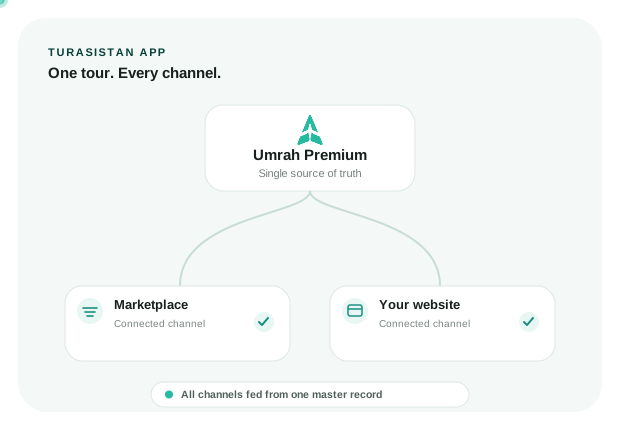
You create your tour once in Turasistan App, and the tour details are sent from there to your connected channels. The master record always stays in Turasistan App, and every other channel is fed from this hub.
In short
One hub, one update, the same accurate information on every channel.
ONE HUB
The master record stays in Turasistan App while connected channels receive the same tour information.
Traditional method vs. Turasistan
TRADITIONAL
Traditional method
The same tour is entered into each site's panel separately
When a price or date changes, every site is updated one by one
Different sites can end up showing different information
Data that doesn't fit a site's own structure can go live incorrectly
A new site means a new panel and a new workload for the team
TURASISTAN
With Turasistan
The tour is created once in Turasistan App and sent to the channels you select
The change is made at the hub and the channels are fed from it
Every channel is fed from the same master record
Nothing is sent until the required mappings are complete
A new channel is managed from the same hub, in the same way
Mapping first, then sending
Every channel has its own structure of definitions and categories. Before a tour is sent to a channel, Turasistan App requires your definitions in the system to be mapped to that channel's definitions.
A tour with incomplete mapping is not sent, so no tour ever goes live on a channel with missing or incorrect information. The goal is simple: run your integrations from one hub and stop errors before they reach the channel.
Nothing is sent with incompatible or missing information
Your tour is published with the right definitions on every channel
Errors are caught before sending, not after publishing
How does it work?
Channels you can distribute your tours to
İslami Tur Sepeti
A marketplace for Hajj, Umrah and faith tours, putting your tours in front of a wide audience looking for them.
Your agency website with Turizm Web
With Turasistan's website solution, your tours are published on your Turasistan tourism website.
What channel management gives you
Starting to sell on a new channel does not add a new panel or a new workload for your team.
The master record always lives in Turasistan App, and every channel is fed from the same data.
Whichever channel the sale happens on, you manage the operation from Turasistan App.
Who is it for?
01
Agencies selling Hajj and Umrah tours both on their own website and on a marketplace
02
Tour operators publishing many tours in the same season
03
Agencies that want to open up new sales channels without adding to their workload
Learn more
You can find publishing tours on your website on our Turizm Web page, and creating tours on our Tour and Operations Management page.
Currently, you can send them to İslami Tur Sepeti and to your agency website built with Turizm Web. As new channels are added, you can send to them from the same hub as well.