
Tour and Operations Management
Tour & Operations Management
Build your tour, run your operations from one screen
Hajj, Umrah, cultural tours or international package tours: it makes no difference. With Turasistan App, you build your tour with every detail and track every step of the operation, from capacity to rooming and from flights to bus seating, in a single panel.
Instead of Excel sheets and scattered lists, everything moves forward in one connected system.
— Tour setup
Build your tour with every detail
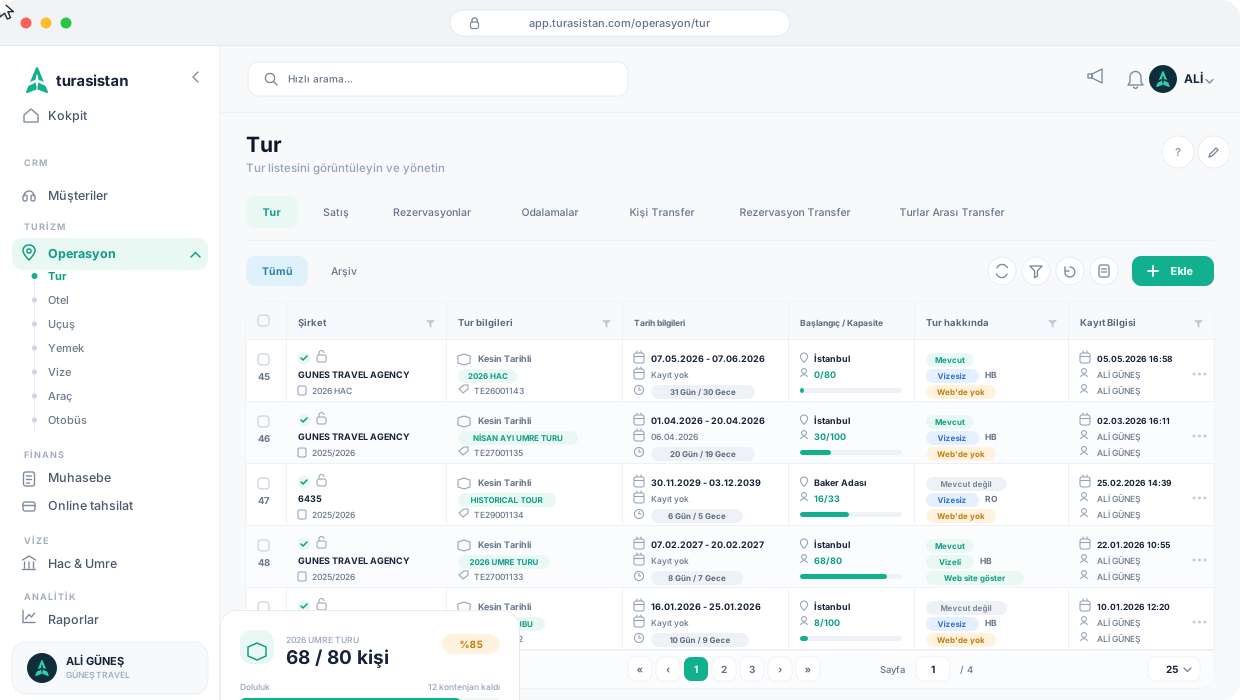
Enter tour dates, departure point and capacity. Define hotels, accommodation and board type, package prices and transportation details. Mark whether the tour includes a visa; every tour is listed with its own tour code.
- ✓ Tour dates, number of days and nights
- ✓ Departure point and capacity
- ✓ Hotel, accommodation and board type
- ✓ Packages and pricing
- ✓ Transportation details
- ✓ Tours with or without visa
- ✓ View past tours and archive them if you wish
— Operations menu
Every part of your operation in one place
Manage your hotel, flight, meal, visa, vehicle and bus details separately under the Operations menu and link them to your tours. You always know which hotel, flight and vehicle each tour uses.
— Capacity
Track your capacity in real time
See all your tours in one list with company, date, departure point and capacity details; search and filter them. At a glance, see how many travelers are registered on each tour, how many seats are left and the occupancy rate.
Your sales team always knows how much space is left on each tour, reducing the risk of overbooking or unsold capacity.
Tour capacity
Dubai & Umrah Tour
Occupancy rate
78%
Remaining capacity
22 seats
Capacity
100
Registered
78
Available
22
— Rooming & transfers
Rooming, seating and moving between tours
Arrange who stays with whom and in which room on the rooming screen, and plan bus and vehicle seating.
When plans change, easily move travelers and reservations to another tour. After the move, simply enter the package and price details on the new tour.
- ✓ Rooming
- ✓ Bus and vehicle seating
- ✓ Moving travelers to another tour
- ✓ Moving reservations to another tour
- ✓ Tour-to-tour transfers
— Lists
Operation lists, ready to go
The lists your operation needs come out of the system ready to use; no more reformatting in Excel.
— Website integration
Publish your tours on your website
You decide whether or not each tour is displayed on your website. Thanks to Turasistan's website integration, the tours you publish also appear on your Turasistan tourism website, so you do not have to update tour information in two separate places.
How does it work?
Create the tour
Enter dates, capacity, hotel, package and transportation details.
Connect the operation
Add hotel, flight, meal, vehicle and bus details to the tour.
Track sales
Watch occupancy and remaining capacity in real time as reservations come in.
Arrange seating
Organize rooming and bus and vehicle seating.
Get your lists
Export flight, insurance, rooming and seating lists in ready-made formats.
Ready to run your tours from one screen?
Build tours and manage every part of your operation with Turasistan App.
You can manage different tour types such as Hajj, Umrah, cultural tours and international package tours in the same system.